How to Get More Leads from WhatsApp: A Simple Guide
 By Muhammad Khalil Arshad
Founder, Nuskia
Updated
13 min read
In this guide14 sections
- 01Why WhatsApp lead generation works
- 02Pick the right WhatsApp tool
- 03WhatsApp lead generation setup: WhatsApp Business
- 04WhatsApp lead generation: where to put your button
- 05Click-to-WhatsApp ads for WhatsApp lead generation
- 06WhatsApp lead generation rules: opt-in done right
- 07Message templates that work
- 08Follow up fast: the key to WhatsApp lead generation
- 09Track your WhatsApp lead generation results
- 10Common mistakes in WhatsApp lead generation
- 11A 30-day WhatsApp lead generation plan
- 12How Nuskia helps with WhatsApp lead generation
- 13Frequently asked questions
- 14Final thoughts
WhatsApp lead generation means using WhatsApp chats to find and win new customers. Set up WhatsApp Business, add click-to-chat links to your site and ads, ask for permission before you message people, reply fast and track every lead. Never spam. Respect opt-in rules.
In Pakistan, people use WhatsApp every day. They chat with family, friends and shops. Many prefer to ask a question on WhatsApp instead of filling a form or making a call.
That is a big chance for your business. A customer who messages you is warm. They have a question. They may buy today.
But many businesses waste this chance. They reply late. They send spam. They lose track of leads. Or they do not track where leads come from.
In this guide, we show you how to get more leads from WhatsApp, the right way. We use simple words and clear steps. We also explain the rules, so you do not risk your account.
Why WhatsApp lead generation works
Here is why WhatsApp is strong for Pakistani businesses:
- People already use it. No new app to install.
- It feels personal. Chats feel closer than forms.
- It is quick. A customer asks, you answer.
- It supports photos, voice notes and documents. Good for products, quotes and proof.
- It works with ads. Click-to-WhatsApp ads open a chat in one tap.
- Trust is easier. People like to talk to a real person before they pay.
WhatsApp suits many businesses: clinics, schools, real estate, shops, tutors, travel, repair services, online stores and more.
It has limits too:
- You must reply fast, or leads go cold.
- One phone can only handle so many chats.
- Spam can get your number blocked.
- It does not replace a website or SEO. It works with them.
Pick the right WhatsApp tool
There are two main business options. Pick based on your size.
WhatsApp Business app
This is a free app for small businesses. You can:
- Create a business profile
- Add a catalog of products or services
- Use quick replies and labels
- Set a greeting and away message
- Chat from a phone, and from a computer through linked devices
Best for: small teams and new businesses.
WhatsApp Business Platform (API)
This is for larger businesses. It works through a provider. You can:
- Connect many agents to one number
- Send approved template messages
- Connect to a CRM or chatbot
- Run bigger campaigns
Best for: teams with high chat volume and a need for automation.
How to choose
Start with the Business app. Move to the Platform when you have many chats a day, several team members and a need for tools. Do not use a personal number for business. Do not use unofficial apps that promise bulk sending. They break the rules and can get you banned.
WhatsApp lead generation setup: WhatsApp Business
A good setup helps people trust you at first sight.
Step 1: Get a business number
Use a number just for your business. Keep it active. It should be a number you will keep for years.
Step 2: Fill in your profile
Add:
- Business name (match your brand)
- Logo as the profile photo
- Short description
- Address and map link
- Opening hours
- Website and email
Make sure these match your website and Google Business Profile.
Step 3: Add a catalog
List your top products or services with photos, short descriptions and prices if you can show them. Keep it neat.
Step 4: Set a greeting message
A greeting welcomes new chats. Keep it short.
Example:
“Hello! Thanks for messaging Nuskia. How can we help you today? We reply Monday to Friday, 10am to 7pm.”
Step 5: Set an away message
When you are closed, tell people when you will reply.
Example:
“Thanks for your message. We are closed now. We will reply on the next working day.”
Step 6: Create quick replies
Save short answers for common questions. Type a shortcut and send. Use them for:
- Price questions
- Location and hours
- How to order
- Next steps
Keep the tone friendly. Edit before you send so the reply fits the person.
Step 7: Use labels
Labels help you sort chats. Make labels like “New lead”, “Quote sent”, “Waiting”, “Won” and “Lost”. This keeps your leads in order.
WhatsApp lead generation: where to put your button
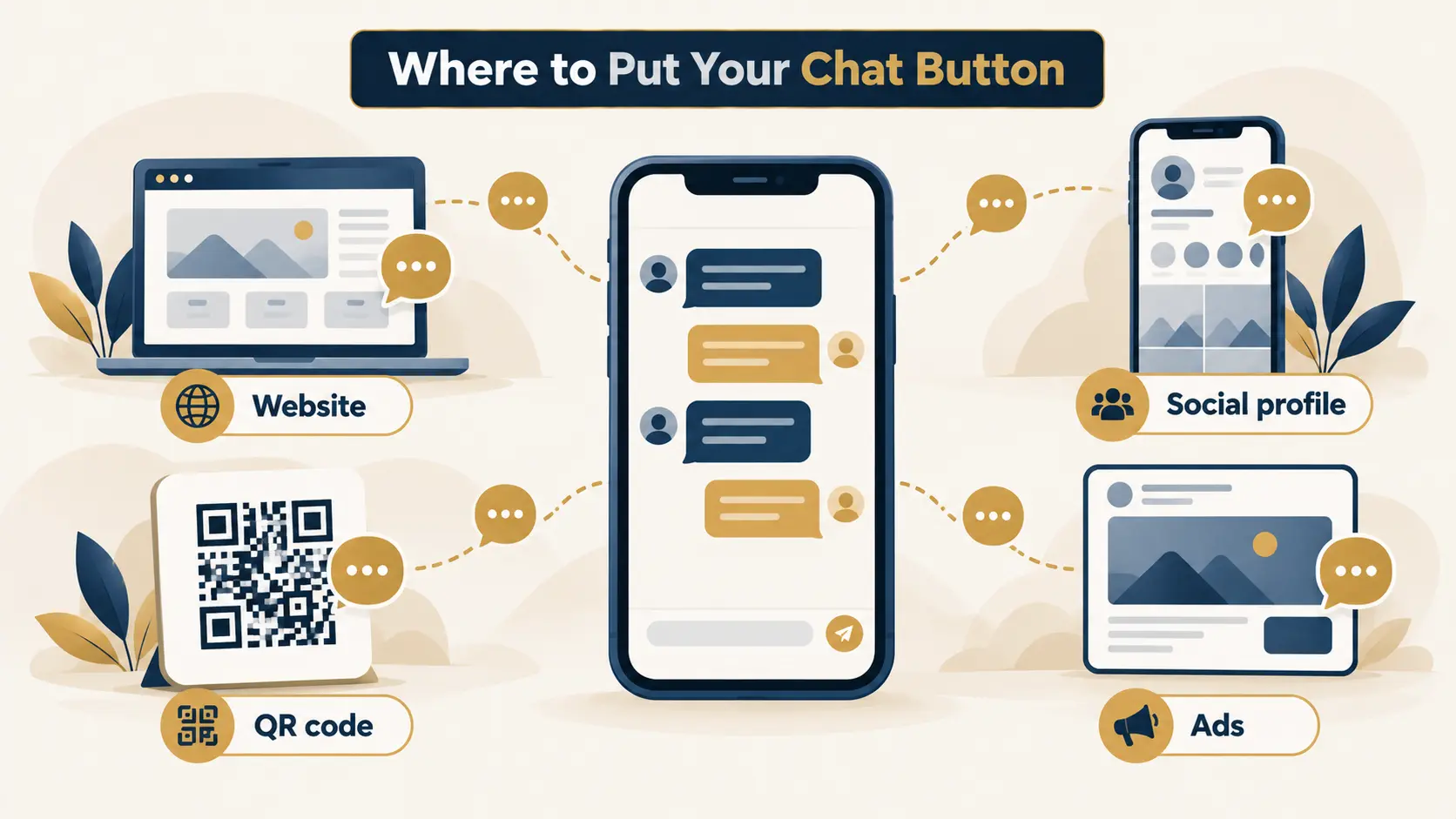
Make it easy to start a chat. Put WhatsApp where customers already look.
On your website
- Add a WhatsApp button in the header and a sticky button on mobile.
- Add it near forms and prices.
- Use a click-to-chat link with a short starting message.
- Show your number as text too.
On your Google Business Profile
Add your phone and website. Add your WhatsApp link where it fits. Reply to messages and reviews.
On social media
Add your link to your Instagram bio, Facebook page button and TikTok bio. Mention WhatsApp in your posts and stories.
On print and offline
Put a QR code on your shop sign, menu, flyers, packaging and receipts.
In emails and signatures
Add a WhatsApp link to your email signature.
How to make a click-to-chat link
A simple link opens a chat with your number. The format is:
https://wa.me/92XXXXXXXXXX
Use your number with the country code and no plus sign or spaces. You can add a starting message so people see what to send. For example, one for ads and a different one for your website, so you can tell the source.
Click-to-WhatsApp ads for WhatsApp lead generation
These ads open a WhatsApp chat when someone taps the button. They work on Facebook and Instagram.
Why they work
- No form to fill in
- One tap to start talking
- Warm leads who chose to message you
How to set them up
- Create a campaign in Meta Ads Manager.
- Pick a goal that fits messages or leads.
- Choose WhatsApp as the place for the message.
- Add your photo or video and a clear short text.
- Set a greeting message so every chat starts well.
- Set a budget and a schedule.
- Launch, then watch the results.
Tips for better results
- f
- Use a clear offer or question in the ad.
- Show a real product or place.
- Use a starting message that matches the ad.
- Reply within minutes.
- Do not send people to an empty chat with no greeting.
To compare ad platforms, read our guide on Google Ads vs Meta Ads. For short-video ads that end in WhatsApp, see how to run TikTok ads in Pakistan.
WhatsApp lead generation rules: opt-in done right
This part protects your account and your brand.
What is opt-in?
Opt-in means the customer gives you clear permission to message them on WhatsApp. WhatsApp’s business rules say businesses need permission before they send business-started messages. You should also keep a record of who agreed, when and how.
When a customer messages you first
If a person messages you, you can reply in that chat. There are time rules on how long you can send free-form replies after their last message. Check WhatsApp’s current rules for your tool.
When you want to message first
If you want to start a chat or send updates or offers, you need opt-in. On the Business Platform, business-started chats use approved message templates. Marketing messages and service messages may be treated differently, so check the current rules.
How to collect opt-in the honest way
- Add a clear checkbox on your forms: “I agree to receive messages from [Your Business] on WhatsApp.”
- Say what you will send and how often.
- Tell people how to stop. For example: “Reply STOP to stop messages.”
- Ask after a support chat: “Can we send you updates on WhatsApp?”
- Use QR codes and click-to-chat links where the person chooses to start.
- Keep records.
What not to do
- Do not buy phone lists and message strangers.
- Do not add people to groups without asking.
- Do not use unofficial bulk sender tools.
- Do not keep messaging someone who said stop.
- Do not send fake offers or false claims.
Spam leads to blocks and reports. Too many reports can restrict your number. It can also cause legal trouble under privacy rules. Our privacy policy shows how we handle contact details on our own site.
Message templates that work
Good messages are short, clear and kind. Use simple words. Here are templates you can adapt.
First reply to a new lead
“Hello [Name], thanks for contacting [Business]. I’m [Your name]. What are you looking for today?”
Ask a smart question
“Which city are you in, and when do you need this? I’ll share the best option.”
Send details
“Here are the details: [short list]. Would you like me to send photos or a price list?”
Share a quote
“Thanks for the details. Here is your quote: [summary]. It is valid until [date]. Shall I book it for you?”
Gentle follow-up (after a day)
“Hi [Name], just checking if you had a chance to look at the quote. Any questions I can answer?”
Last follow-up
“Hi [Name], I’ll close this for now. If you need help later, just message me here. Have a great day!”
After a sale
“Thank you for choosing [Business]! If you need anything, message us here. We would love a short review when you are ready.”
Tips for messages
- Use the person’s name.
- Keep each message short.
- Ask one question at a time.
- Use voice notes when it feels natural.
- Do not paste long blocks of text.
- Do not use all caps.
- Be honest about price and time.
Follow up fast: the key to WhatsApp lead generation
Speed wins leads. A quick reply says you care. A slow reply sends people to your competitor.
Set a reply goal
Aim to reply within a few minutes during working hours. Use quick replies and a greeting to help.
Share the load
If you have a team, decide who answers which chats. Use labels. Make sure someone owns each lead.
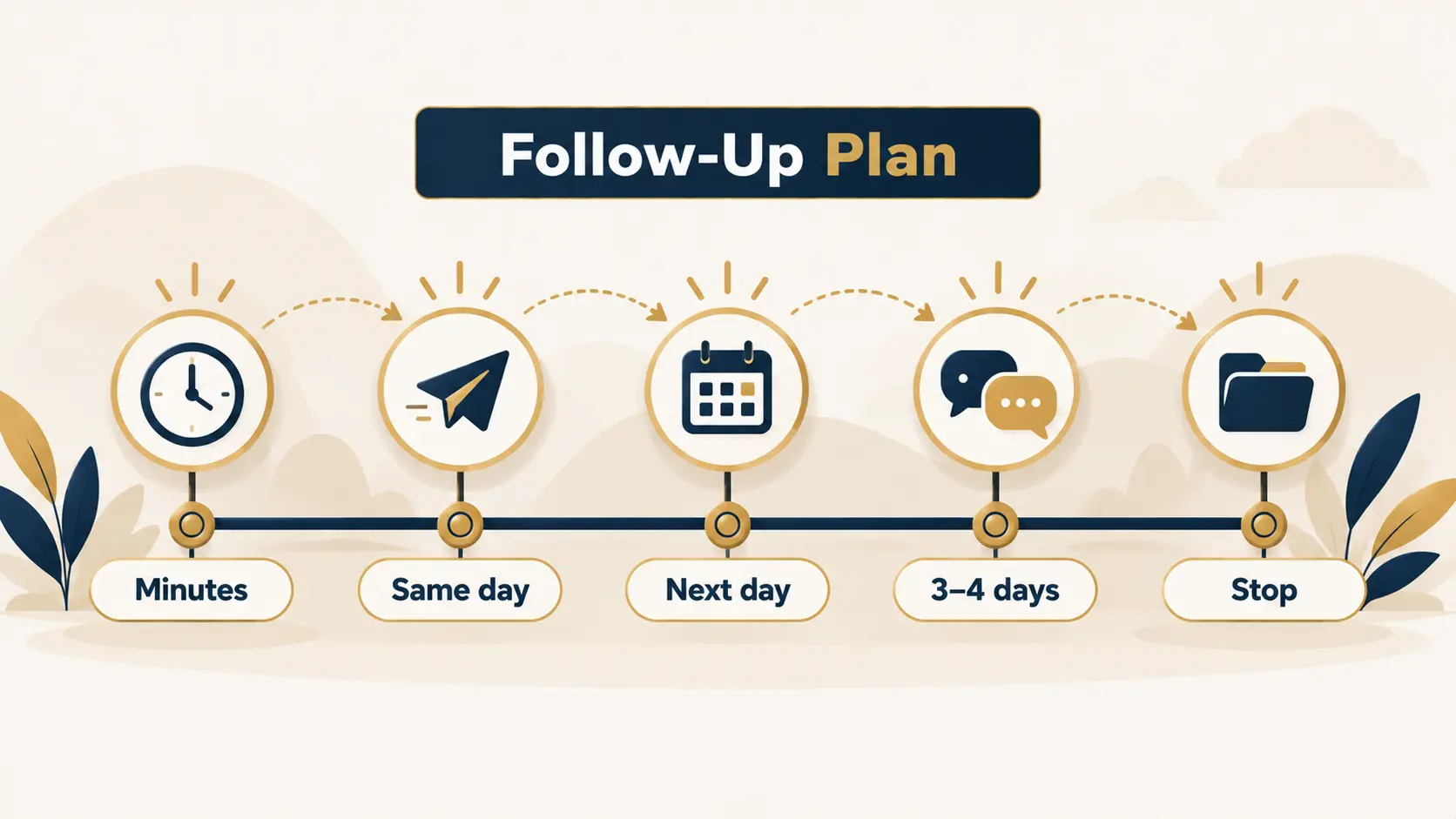
Use a simple follow-up plan
- Within minutes: reply to the first message.
- Same day: send details and ask one next step.
- Next day: follow up if there is no reply.
- After three or four days: send a last friendly message.
- Then stop. Do not chase for weeks.
Keep your promises
If you say “I’ll call at 4pm”, call at 4pm. Trust is your best sales tool.
Track your WhatsApp lead generation results
If you do not track, you cannot improve. Here is a simple system.
What to track
- Where the lead came from (website, ad, social, QR code)
- Date and time
- Name and number
- What they asked for
- Stage: new, quoted, won, lost
- Sale value
- Reason if lost
Use different starting messages
Use a different pre-filled message for each source. For example, “Hi, I saw your Instagram offer” or “Hi, I came from your website”. Then you can see what works.
Use a simple sheet or CRM
A spreadsheet works well at first. Later, use a CRM that connects to WhatsApp. Make sure you follow privacy rules.
Track website clicks
Set up tracking for WhatsApp button clicks in Google Analytics, Meta and your other tools. That shows which pages and ads bring chats.
Review every week
Look at the number of chats, the speed of replies, the number of quotes and the number of sales. Fix what is weak. For a full list of what to show in reports, read our guide on the monthly marketing report.
Common mistakes in WhatsApp lead generation
Replying late
A lead that waits a day often goes elsewhere.
Using a personal number
Your business looks less professional. You mix private and work chats.
Messaging without permission
This is spam. It can get you blocked.
Using bulk sender tools
Unofficial tools break rules and risk your number.
Sending walls of text
Short messages get more replies.
No follow-up
Many sales happen on the second or third message.
No tracking
You cannot see what works.
Pushing too hard
Be helpful, not pushy. Answer questions first.
Ignoring your website
A slow or confusing site wastes your WhatsApp traffic. A clear page with a WhatsApp button wins more leads. Our web design team can help.
A 30-day WhatsApp lead generation plan
Week 1: Set up
- Create your WhatsApp Business profile.
- Add a catalog, a greeting, an away message, quick replies and labels.
- Make a click-to-chat link.
Week 2: Place your buttons
- Add buttons to your website and social bios.
- Add a QR code to your shop and print items.
- Add opt-in text to your forms.
Week 3: Run a small test
- Try one click-to-WhatsApp ad with a small budget.
- Use a different starting message for the ad.
- Reply fast to every chat.
Week 4: Track and improve
- Review your leads in a sheet.
- Find which source brought the best leads.
- Improve your replies, your offer and your follow-up.
- Repeat what works.
How Nuskia helps with WhatsApp lead generation
We plan lead generation for Pakistani businesses with ads, landing pages and WhatsApp follow-up. We help you:
- Set up your WhatsApp Business profile
- Build landing pages with WhatsApp buttons
- Run click-to-WhatsApp ads
- Set up tracking for chats and sales
- Plan follow-up messages
- Get a weekly update and a full monthly report
See our lead generation services in Pakistan, or contact us on WhatsApp.
Frequently asked questions
What is WhatsApp lead generation?
It is the use of WhatsApp chats to find and win new customers. You attract people with your website, ads and social pages. They start a chat. You answer fast, share details and move them toward a sale.
Is WhatsApp good for small businesses?
Yes. It is free to start with the WhatsApp Business app. It is also familiar to most Pakistani customers. It works well for questions, quotes, bookings and follow-up.
Do I need permission to message customers?
Yes, for messages that you start. WhatsApp’s business rules say you need the customer’s permission. Collect opt-in with a clear checkbox, tell people what you will send and how to stop, and keep records.
What is a click-to-WhatsApp ad?
It is an ad on Facebook or Instagram with a button that opens a WhatsApp chat. People tap and start talking to you. These ads often give warm leads, but you must reply fast.
Can I use bulk messaging tools?
Be careful. Unofficial bulk tools break WhatsApp’s rules and can get your number banned. Use the Business app or the official Business Platform, and message only people who agreed.
How fast should I reply to WhatsApp leads?
As fast as you can, ideally within minutes during working hours. Use greeting messages, quick replies and clear team roles so no chat waits.
How do I know which ad or page brought the lead?
Use a different pre-filled starting message for each source and track WhatsApp button clicks in your analytics. Also ask each new lead how they found you.
Can Nuskia help with WhatsApp lead generation?
Yes. We plan the ads, the landing pages, the follow-up and the tracking. Request a free lead audit to start.
Final thoughts
WhatsApp is one of the best places to meet customers in Pakistan. But it only works if you do the basics: a clean profile, easy buttons, honest permission, fast replies and clear tracking.
Start small. Reply fast. Follow the rules. Improve each week.
Want more leads from WhatsApp? Request a free lead audit and we will show you where to start. You can also see our lead generation services or contact us.